FlexBank SMS opt-in
Actual authenticated FlexBank interface, captured October 22, 2026.
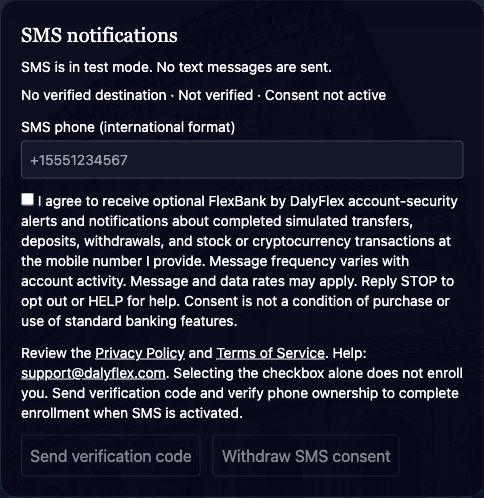
Affirmative opt-in workflow
- Authenticated customers open Profile → SMS notifications.
- The optional consent checkbox starts unchecked. Customers enter their own mobile number and review the disclosure, Privacy Policy and Terms.
- When activated, selecting Send verification code submits affirmative consent with the disclosure version. The server records consent and begins phone verification.
- Ownership verification must succeed before notification eligibility. Saved profile information or preferences alone never enroll a phone.
Consent is not required for purchase or standard simulated banking. Message frequency varies and message/data rates may apply. SMS and category preferences additionally control eligibility. Withdrawing consent in Profile or a signed STOP message blocks future delivery. Signed HELP requests return support instructions; provider-managed responses are not duplicated.
Records and preservation
The private database stores consent and verification timestamps, disclosure version, opt-out state and append-only change records. No existing customer was enrolled or had preferences changed to produce this evidence. The screenshot is cropped to the real SMS panel only; no customer identity or financial data is published.
Disclosure version: 2026-10-22-v1. Application implementation: a317c2a.
SMS program information · Privacy Policy · Terms of Service · Support